
Ask Marloo anything in Chat
Ask Marloo anything, from general questions to your clients, meetings, tasks, documents and emails, all from one chat.
Quick flowchart: ask Marloo anything in 5 steps
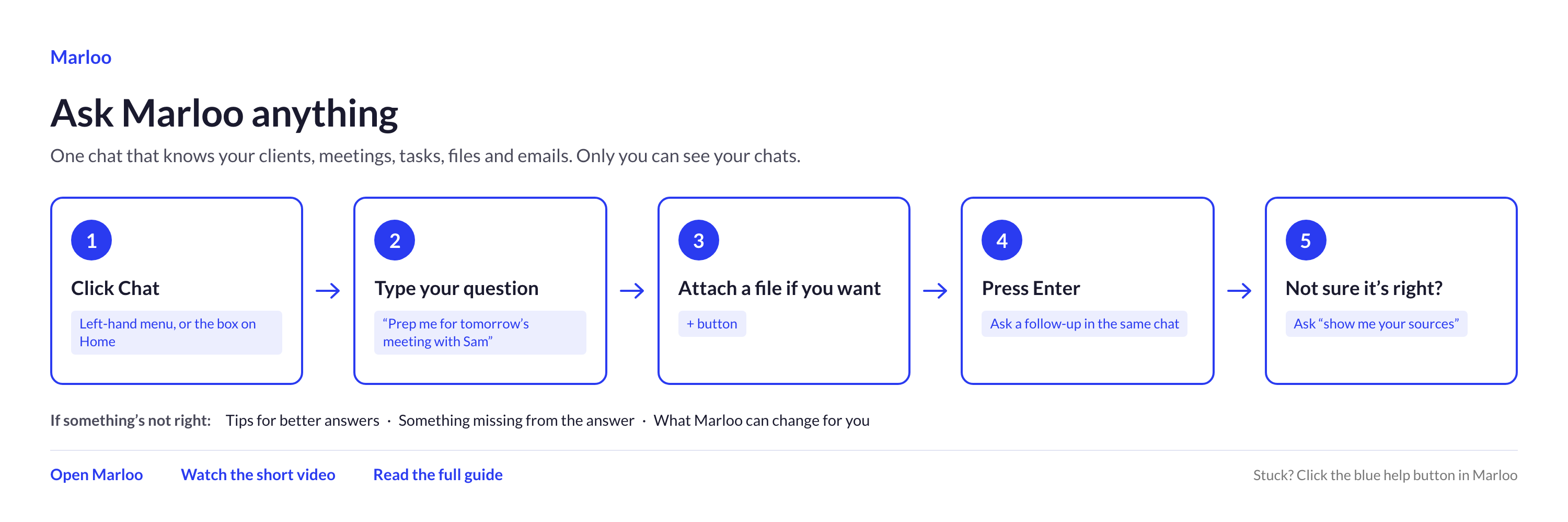
The Chat page is one place to ask Marloo anything. Ask a general question, or ask about your clients, meetings, tasks, documents and emails, without opening each record first.
Because it runs inside Marloo, it can see the client records you have access to, so you don't need to copy information in. Marloo processes your questions with its AI providers; see the Marloo Trust Centre for its sub-processors.
You could ask:
- "Which of my clients have a review due this month?"
- "Prepare me for tomorrow's meeting with Sam Taylor."
- "How is Alice's 401(k) performing?"
- "What do the recent tax changes mean for Priya?"
- "What follow-ups came out of my meetings this week?"
- "Show me the open tasks for the advice team."
- "Prep me for my meetings today."
Start a chat
- Select Chat in the main menu, or use the chat box at the top of Home.
- Type your question into Ask Marloo anything, or pick one of the suggested prompts to get going.
- Add a file if you want Marloo to read it alongside your question.
- Send your message. You can ask follow-up questions in the same chat.
You do not have to wait for Marloo to finish before sending your next message. Type it while Marloo is still working and it lines up above the message box, then sends when the reply finishes. You can edit or delete a queued message before it goes, or choose Send now to cut the current reply short. If you stop a reply or it fails, the queue pauses with Resume or Clear; if Marloo asks you a question, the queue waits for your answer.
What can Ask Marloo help with?
Ask Marloo can search and summarize information from across Marloo, including:
- Clients
- Meetings and transcripts
- Tasks and follow-ups
- Documents, files and notes
- Connected emails
- Templates
It can also answer general questions, help you prepare for meetings, draft content, search the web and work with files you upload. Chat is included on every plan, including Free, with no limit.
Who can see my chats?
Only you can see your chats.
Advisors, Support users, Managers and Account owners cannot open, search or continue another person's chats.
Files you upload directly to a chat are private to you too. Asking about a shared client or meeting does not share your chat with anyone else.
Can Ask Marloo make changes for me?
Yes. Ask Marloo can help you create tasks, notes, meetings and clients. It can also update details such as contact information, date of birth, tax reference, review dates, tags and advisor relationships, and a client's name, client type, active or inactive status and privacy setting. Only a client's advisors, Managers and Account owners can change its privacy setting.
Ask Marloo makes changes as soon as you ask, with no separate confirm step. Word your request carefully, then check the result it reports: it tells you what was updated and what failed.
Tag clients by a rule
Ask Marloo can find every client matching a rule and add or remove a tag on all of them in one request. For example:
- "Tag every client with an overdue review as Priority"
- "Tag clients I haven't met in 12 months as Lost"
Rules can use fields such as next review date, last meeting date, age, risk profile, net worth, advisor and existing tags.
Notes you create in chat, such as a file note of your research, are saved on the client's Notes tab in Marloo. Marloo can't write a note into a Word document in OneDrive or SharePoint, or back into your CRM. Copy the note across if you need it there too.
Tips for better answers
- Name the client or colleague if the question could be unclear.
- Add a date range when asking about meetings, tasks or reviews.
- Use "my clients" for clients assigned to you.
- Use "all clients I can access" for a wider search.
- Ask Marloo to show its sources when you want to check an answer.
What information can I ask about?
The answer depends on your role and how the information has been shared. Client access, meeting privacy and email sharing are checked separately.
For example, you might be able to see a client but not a private meeting held with that client.
Clients
Everyone can ask about clients shared with the firm.
For private clients, access depends on your role:
| Your role | Private clients you can ask about |
|---|---|
| Advisor | Clients assigned to you, plus any others you have been given access to |
| Support | Clients you have been given access to |
| Manager | Every active private client in the firm |
| Account owner | Every active private client in the firm |
Managers and Account owners can ask for a specific advisor's full client list.
Advisors and Support users can ask about any client they can access, but cannot pull another advisor's full client list.
One phrase to watch: when you ask about "my clients", Marloo only looks at clients where you are named as an advisor. Ask for "all clients I can access" if you want Marloo to include shared clients and private clients you have access to.
If something is missing
Check whether the client is active and whether the meeting, email or client has been shared with you.
If you can see a client but not one of their meetings, the meeting may be private. If an email is missing, it may not have been shared with that client.
Help us improve it
Ask Marloo gets better from what you tell us. If it gets a question wrong, misses something it should know, or you want it to do something it cannot yet, tell us through the blue chat button in the bottom-right corner. The first question it gets wrong is the most useful one to hear about.
Still stuck? Talk to a human.
Email the Marloo team with what you are seeing. If you are in the app, the blue chat button in the bottom-right corner is the fastest way to reach us.


