
Export or delete your firm's data
How to export your firm's data from Settings, how long the download link lasts, and how to delete your account or set recording and transcript auto-delete.
You can export your firm's data from Marloo at any time, and ask for your account to be deleted when you leave. This article is for Account owners.
Export your firm's data
- Go to Settings > Company settings.
- Under Data export, click Request export.
- Marloo emails you when it's ready. Click Download next to the export. Each export can be downloaded for 7 days, so download the file before it expires.
The export is one zip file with your company's clients, meetings, documents, files and tasks. It includes private meetings and private clients. Only Account owners see the export option. If you don't see it, ask your Account owner.
Delete your account
Account deletion is by support request. Email support@gomarloo.com from the address on your account, and say whether you want just one user's account deleted or your whole firm's company account and all of its data. Deletion is permanent. Before you set a retention period or delete records, check how long your local rules require you to keep advice records. For the full steps, see How to delete your Marloo account. Export your data first.
Set recording and transcript auto-delete
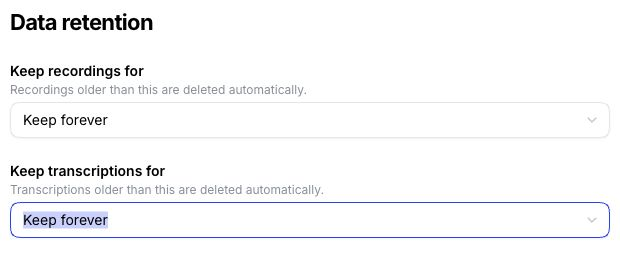
The Account owner sets how long Marloo keeps recordings and transcripts. In Settings > Company settings > Data retention, set Keep recordings for and Keep transcriptions for separately. Each setting deletes records older than its selected period. Before you set a retention period or delete records, check how long your local rules require you to keep advice records. To delete a single transcript, recording or meeting, see Delete a transcript, recording or meeting.
Related articles
Still stuck? Talk to a human.
Email the Marloo team with what you are seeing. If you are in the app, the blue chat button in the bottom-right corner is the fastest way to reach us.


